What to Expect in an InterWiz Interview
September 30, 2025 | 4 min read
OVERVIEW
InterWiz uses an AI Interviewer (Ava) to make interviews structured, fair, and efficient. Depending on your stage in the hiring process, your interview may include different assessments. This guide explains the types of interviews, what happens during each assessment, and what you’ll see in the AI interview interface.
Types of AI Interviews
There are two main types of interviews on InterWiz:
Screening Interview
A shorter interview (usually around 35-50 minutes) designed to quickly filter candidates. It checks your basic qualifications, role fit, and general skills.In-depth Interview
A longer interview (usually around 60-90 minutes) that dives deeper into technical skills, thoroughly evaluating shortlisted candidates to support final hiring decisions.
It’s possible for an interview to contain more than one type of assessment, depending on the role.
Types of Assessments
An AI interview may include one or more of the following assessments:
Basic Screening Assessment – Questions about your background, basic skills, and availability.
Role-Specific Screening Assessment – A quick test of the core skills required for the role.
Professional Assessment – Evaluates workplace behavior, professionalism, and soft skills.
Role-Specific Structured Assessment – A detailed assessment of role-related skills.
Custom Assessment – Tailored questions designed by the recruiter.
Analytical Assessment – Measures problem-solving and analytical thinking skills.
Programming Assessment – A live coding test to evaluate real-time technical problem solving.
The email you receive when your interview is scheduled will list exactly which assessments are included.
Inside a Theoretical Assessment
All assessments except Analytical and Programming fall under the category of Theoretical Assessments. When you join a theoretical assessment, Ava, the AI Interviewer, will:
Greet you and give an overview of the upcoming assessments.
Begin the assessment, which may include one or more of the assessment types listed above.
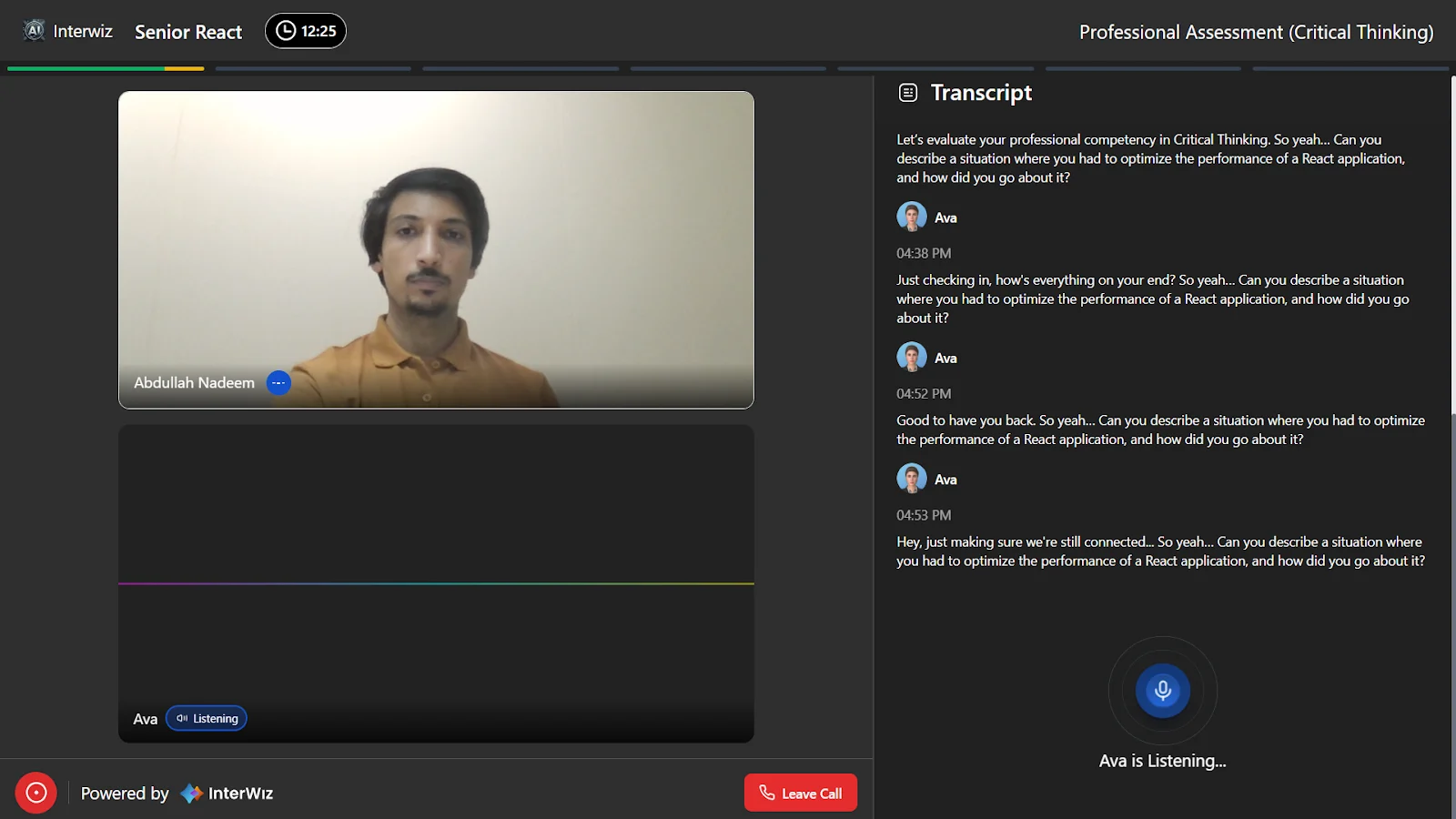
During the interview, the interface looks like this:
Top bar: Displays the job designation, elapsed time, and the current assessment.
Progress bar: Shows how many sections there are and your progress through them.
Transcript panel (right side): Displays the full conversation for reference.
Mic indicator: A mic icon with the text “Ava is Listening” appears when it’s your turn to speak.
Inside an Analytical Assessment
The analytical assessment evaluates your reasoning and problem-solving abilities.
Click here to learn more about Analytical Assessment
Inside a Programming Assessment
The programming assessment is a live coding test where you’ll solve problems in real time.
Click here to learn more about Programming Assessment