Understanding Analytical Assessment
September 19, 2025 | 3 min read
OVERVIEW
Some interviews include an Analytical Assessment to evaluate your problem-solving and logical reasoning skills. This guide explains what to expect, how to navigate the interface, and how your answers are submitted.
Getting Started
Carefully read through the instructions provided before the assessment begins.
Click the “I am ready” button to start.
Inside the Analytical Assessment
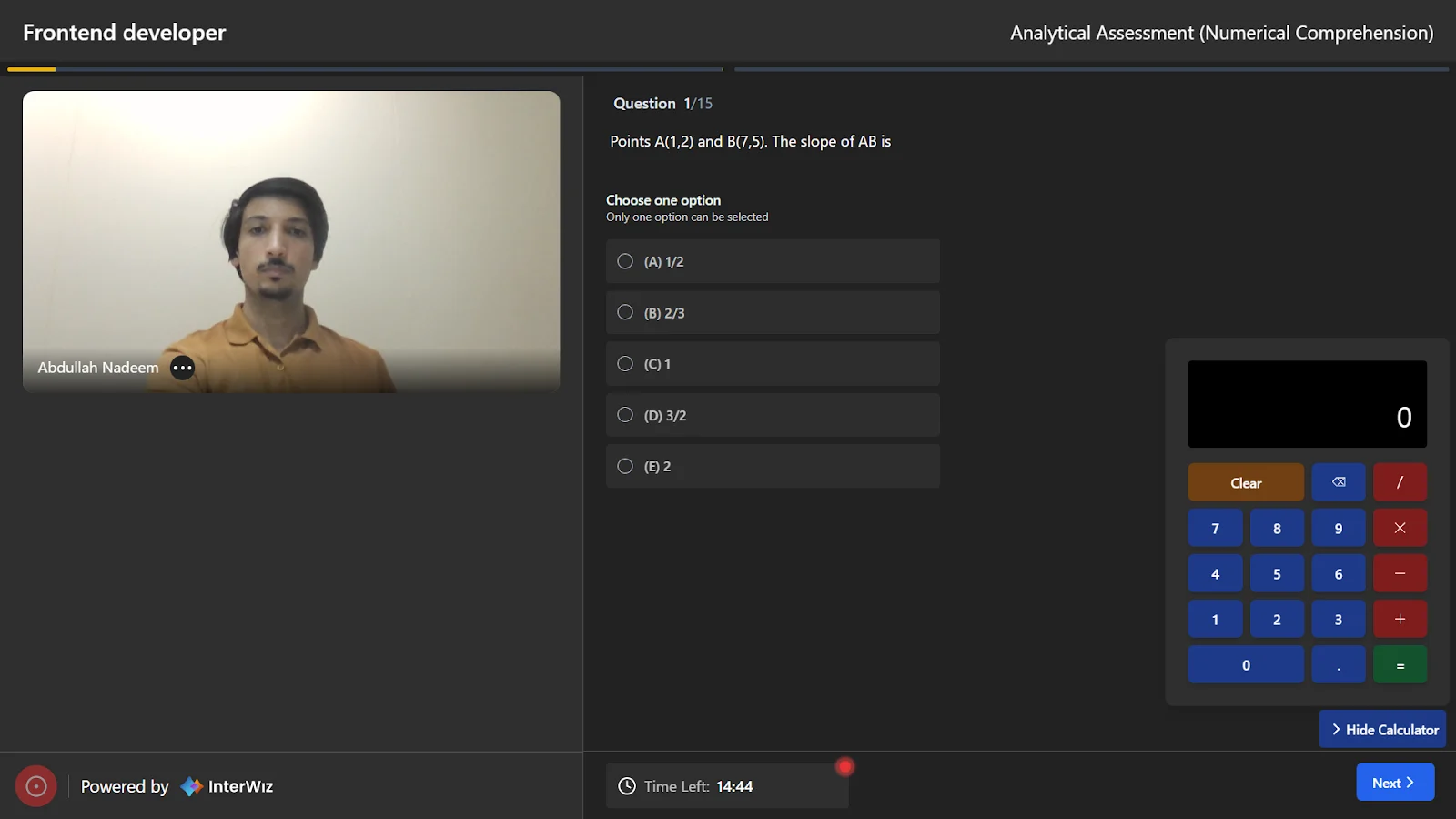
Once you join, you’ll see an interface with the following elements:
Question panel: Displays the question text, total number of questions, and multiple-choice options.
Built-in calculator (right-hand side): Available for questions where calculations may be needed. You can hide it if not required.
Navigation buttons (bottom-right): Use Next and Previous to move between questions. You can revisit earlier questions and update your answers anytime before submission.
Timer (bottom-left): Shows the total remaining time for the entire assessment.
Timer and Submission
The assessment is timed, and the countdown is always visible at the bottom of the screen.

Once the timer reaches zero, your answers will be automatically submitted.
If you finish early, you can submit your answers before the timer expires by navigating to the last question and clicking on the Submit button.